Annotation Consensus and IoU Metrics Tutorial
This notebook provides a comprehensive guide on calculating consensus metrics and IoU (Intersection over Union) scores for annotations using the Dataloop platform and its Python SDK. It covers various annotation types including classifications, bounding boxes, polygons, and segmentation masks.
Consensus metrics help evaluate the agreement between multiple annotators working on the same data, which is crucial for quality assurance and understanding annotation reliability.
Prerequisites:
- Dataloop Account: You should have access to a Dataloop platform account.
- Python Environment: Ensure you have Python 3.7+ installed with pip.
- Annotated Data: Access to items with annotations from multiple annotators.
Navigate through the following sections:
- Dependencies & Setup
- Understanding IoU and Consensus
- Classification Consensus and Majority Vote
- Bounding Box IoU Matching
- Polygon and Segmentation IoU
- Multi-Annotator Comparison
- Conclusion and Next Steps
1. Dependencies & Setup
First, let's ensure all required Python packages are installed and import the necessary libraries.
!pip install dtlpy matplotlib seaborn --upgrade --quietImport Required Libraries
Now, we import all the Python libraries that will be used throughout this tutorial.
import dtlpy as dl
from dtlpy.ml import metrics, predictions_utils
from PIL import Image
import matplotlib.pyplot as plt
import numpy as np
import seaborn as sns
from collections import Counter
%matplotlib inline
2. Understanding IoU and Consensus
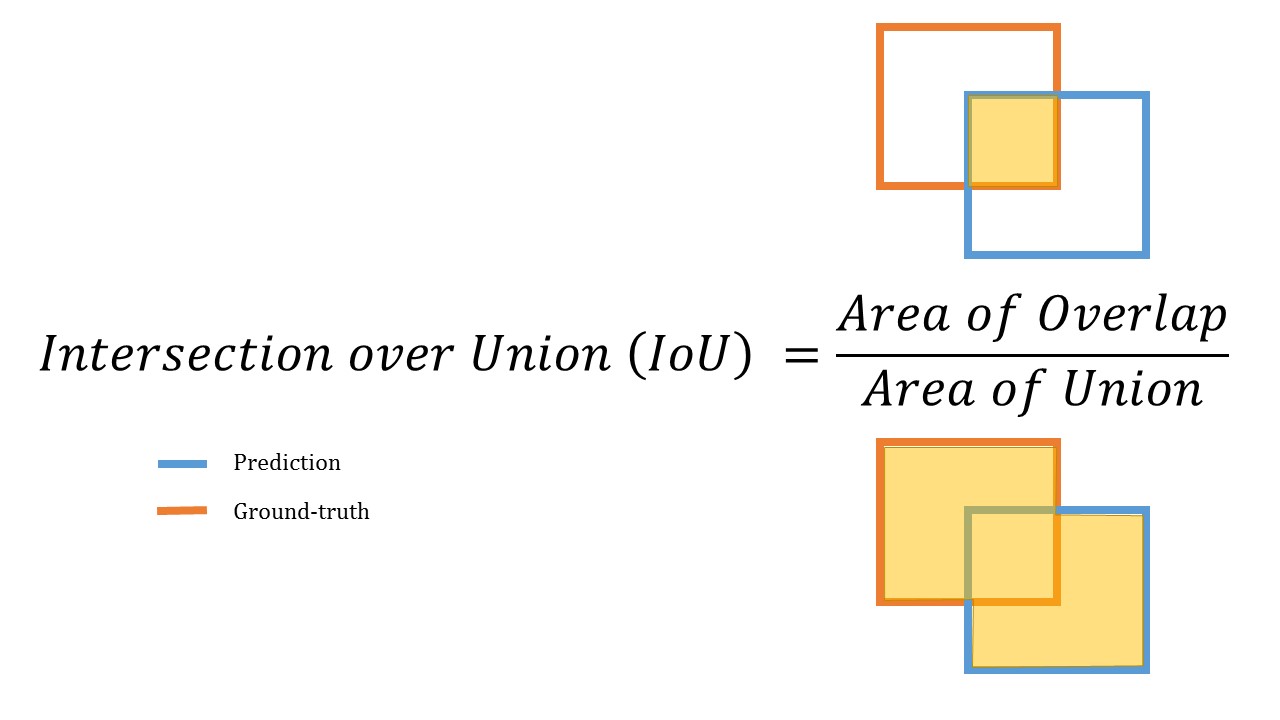
What is IoU (Intersection over Union)?
IoU is a metric used to evaluate the accuracy of object detection and segmentation models by measuring the overlap between predicted and ground truth annotations.
Consensus in Dataloop supports the following annotation types:
- Classification (Label IoU)
- Bounding Box (IoU)
- Polygon (IoU)
- Semantic Segmentation (IoU)
- Point (distance scoring)
3. Classification Consensus and Majority Vote
3.1 Load Sample Data
We'll demonstrate consensus calculation using 5 annotators working on the same items. First, let's retrieve the annotated items and their annotations.
Note: Replace the item IDs below with your own annotated items.
# Retrieve items with annotations from multiple annotators
first_item = dl.items.get(item_id='6215d3f73750a54742c4d33d')
second_item = dl.items.get(item_id='6215d3fee2b78c63e4ae501f')
third_item = dl.items.get(item_id='6215d4053750a5fe47c4d343')
fourth_item = dl.items.get(item_id='6215d40ce2b78c3b85ae5022')
fifth_item = dl.items.get(item_id='6215d415e2b78c36b7ae5028')

# Get annotations for each item
first_annotations = first_item.annotations.list()
second_annotations = second_item.annotations.list()
third_annotations = third_item.annotations.list()
fourth_annotations = fourth_item.annotations.list()
fifth_annotations = fifth_item.annotations.list()
3.2 Examine Annotator Labels
Let's see which labels each annotator assigned to their respective items.
print(f'{first_item.name} annotations: {[annotation.label for annotation in first_annotations]}')
print(f'{second_item.name} annotations: {[annotation.label for annotation in second_annotations]}')
print(f'{third_item.name} annotations: {[annotation.label for annotation in third_annotations]}')
print(f'{fourth_item.name} annotations: {[annotation.label for annotation in fourth_annotations]}')
print(f'{fifth_item.name} annotations: {[annotation.label for annotation in fifth_annotations]}')
3.3 Calculate Consensus Matrix
To create the annotators' scoring matrix, we calculate IoU between each pair of annotators and store the results.
items_list = [first_item, second_item, third_item, fourth_item, fifth_item]
n_annotators = len(items_list)
items_scores = np.zeros((n_annotators, n_annotators))

for i_item in range(n_annotators):
    for j_item in range(n_annotators):
        # Note: the results matrix is symmetric so calculation can be done only on one side of the diagonal
        # We do both sides to show that the score is the same: measure_item(x, y) == measure_item(y, x)
        success, results = predictions_utils.measure_item(items_list[i_item], items_list[j_item], ignore_labels=False)
        items_scores[i_item, j_item] = results['total_mean_score']
3.4 Examine Detailed Results
The returned Result object contains a pandas DataFrame with all matching details and scores.
success, results = predictions_utils.measure_item(first_item, second_item, ignore_labels=False)
results[dl.AnnotationType.CLASSIFICATION].to_df()
3.5 Visualize Consensus Matrix
We'll create a heatmap to visualize the consensus scores between annotators.
sns.heatmap(items_scores,
            annot=True,
            cmap='Blues',
            xticklabels=['Annotator A','Annotator B','Annotator C', 'Annotator D', 'Annotator E'],
            yticklabels=['Annotator A','Annotator B','Annotator C', 'Annotator D', 'Annotator E'])
plt.title('Annotator Consensus Matrix')
plt.show()
3.6 Calculate Majority Vote
Count the appearances of each label across all annotators to determine majority consensus.
# Count occurrences of each label
all_annotations = [first_annotations, second_annotations, third_annotations, fourth_annotations, fifth_annotations]
all_labels = [annotation.label for annotations in all_annotations for annotation in annotations]
counter = Counter(all_labels)

print("Label frequency across all annotators:")
for label, count in counter.items():
    print(f'{label}: {count}')

# Identify majority labels (3 or more annotators)
majority_threshold = 3
majority_labels = [label for label, count in counter.items() if count >= majority_threshold]
print(f"\nMajority labels (≥{majority_threshold} annotators): {majority_labels}")
4. Bounding Box IoU Matching
4.1 Load Bounding Box Data
Box matching follows the same principles as classification consensus. Let's retrieve items with bounding box annotations.
first_item = dl.items.get(item_id='6214bc0d3750a50f50c44841')
second_item = dl.items.get(item_id='6214be90fed92a9f043ba217')
first_annotations = first_item.annotations.list()
second_annotations = second_item.annotations.list()
4.2 Visualize Annotations
Display the annotations for each item to understand the data we're working with.
plt.figure(figsize=(15, 5))

plt.subplot(1, 3, 1)
plt.imshow(first_annotations.show())
plt.title('First Annotator')
plt.axis('off')

plt.subplot(1, 3, 2)
plt.imshow(second_annotations.show())
plt.title('Second Annotator')
plt.axis('off')

plt.subplot(1, 3, 3)
plt.imshow(first_annotations.show())
plt.imshow(second_annotations.show(), alpha=0.7)
plt.title('Overlay Comparison')
plt.axis('off')

plt.tight_layout()
plt.show()
4.3 Calculate IoU with Label Matching
Run the comparison with label matching enabled (annotations must have the same label to be considered a match).
success, results = predictions_utils.measure_item(first_item, second_item, ignore_labels=False)
print("Results with label matching:")
print(results[dl.AnnotationType.BOX].to_df())
4.4 Calculate IoU Ignoring Labels
Run the same comparison but ignore labels (any overlapping boxes are considered potential matches).
success, results = predictions_utils.measure_item(first_item, second_item, ignore_labels=True)
print("Results ignoring labels:")
print(results[dl.AnnotationType.BOX].to_df())
4.5 Examine Detailed Matching Results
View the detailed annotation comparison matrix and individual scores.
# View detailed matching matrix
print("Detailed annotation comparison matrix:")
print(results['box'].matches._annotations_raw_df[0])

# Show individual annotation scores and overall mean
print("\nIndividual annotation scores:")
print(results['box'].to_df()['annotation_score'])
print(f"\nTotal mean score: {results['total_mean_score']}")
5. Polygon and Segmentation IoU
5.1 Load Segmentation Data
Similar to previous examples, we'll calculate IoU scores for polygon and segmentation annotations.
first_item = dl.items.get(item_id='6214d07599cb175c9cd73d8f')
second_item = dl.items.get(item_id='6214d07c9d80b05b8310ba9b')
first_annotations = first_item.annotations.list()
second_annotations = second_item.annotations.list()
5.2 Visualize Segmentation Annotations
Display the segmentation masks for comparison.
plt.figure(figsize=(15, 5))

plt.subplot(1, 3, 1)
plt.imshow(first_annotations.show())
plt.title('First Annotator')
plt.axis('off')

plt.subplot(1, 3, 2)
plt.imshow(second_annotations.show())
plt.title('Second Annotator')
plt.axis('off')

plt.subplot(1, 3, 3)
plt.imshow(first_annotations.show())
plt.imshow(second_annotations.show(), alpha=0.7)
plt.title('Overlay Comparison')
plt.axis('off')

plt.tight_layout()
plt.show()
5.3 Calculate Segmentation IoU
Calculate IoU scores for segmentation annotations with a match threshold of 0.
success, results = predictions_utils.measure_item(first_item, second_item, ignore_labels=True, match_threshold=0)
print("Segmentation IoU results:")
print(results[dl.AnnotationType.SEGMENTATION].to_df())

# View detailed matching information
print("\nDetailed segmentation matching:")
print(results[dl.AnnotationType.SEGMENTATION].matches._annotations_raw_df[0])

print(f"\nTotal segmentation score: {results['total_mean_score']}")
6. Multi-Annotator Comparison
6.1 Load Multi-Annotator Data
For comprehensive consensus analysis, let's examine annotations from three different annotators on the same content.
first_item = dl.items.get(item_id='6214ea1d0ec695cd9c35dfbd')
second_item = dl.items.get(item_id='6214ea29e2b78c7ca1adc6b7')
third_item = dl.items.get(item_id='6214ea310ec695600635dfc6')
first_annotations = first_item.annotations.list()
second_annotations = second_item.annotations.list()
third_annotations = third_item.annotations.list()
6.2 Visualize All Annotators
Display annotations from all three annotators with different visual properties for distinction.
plt.figure(figsize=(20, 5))

plt.subplot(1, 4, 1)
plt.imshow(first_annotations.show())
plt.title('Annotator A')
plt.axis('off')

plt.subplot(1, 4, 2)
plt.imshow(second_annotations.show())
plt.title('Annotator B')
plt.axis('off')

plt.subplot(1, 4, 3)
plt.imshow(third_annotations.show())
plt.title('Annotator C')
plt.axis('off')

plt.subplot(1, 4, 4)
plt.imshow(first_annotations.show(thickness=20))
plt.imshow(second_annotations.show(thickness=10))
plt.imshow(third_annotations.show(thickness=3))
plt.title('All Overlaid (Different Thickness)')
plt.axis('off')

plt.tight_layout()
plt.show()
6.3 Calculate Pairwise Consensus Matrix
Calculate consensus scores between all pairs of annotators.
items = [first_item, second_item, third_item]
n_annotators = len(items)
items_scores = np.zeros((n_annotators, n_annotators))

for i_item in range(n_annotators):
    for j_item in range(i_item, n_annotators):
        success, results = predictions_utils.measure_item(items[i_item], items[j_item], ignore_labels=True)
        items_scores[i_item, j_item] = results['total_mean_score']
        items_scores[j_item, i_item] = results['total_mean_score']  # Symmetric matrix
6.4 Visualize Multi-Annotator Consensus
Create a heatmap showing consensus scores between all three annotators.
plt.figure(figsize=(8, 6))
sns.heatmap(items_scores,
            annot=True,
            cmap='Blues',
            xticklabels=['Annotator A','Annotator B','Annotator C'],
            yticklabels=['Annotator A','Annotator B','Annotator C'])
plt.title('Three-Annotator Consensus Matrix')
plt.show()
7. Conclusion and Next Steps
Congratulations! You have successfully walked through the process of calculating annotation consensus and IoU metrics using the Dataloop platform.
Summary of What You've Accomplished:
- Understood IoU metrics and their importance in annotation quality assessment
- Calculated classification consensus and majority voting across multiple annotators
- Analyzed bounding box IoU matching with and without label constraints
- Evaluated polygon and segmentation annotation agreement
- Performed comprehensive multi-annotator consensus analysis
- Visualized consensus results using heatmaps and overlay comparisons
Next Steps:
- Quality Assurance Workflows: Use these metrics to identify items requiring re-annotation or consensus resolution
- Annotator Performance Analysis: Track individual annotator consistency and accuracy over time
- Active Learning: Leverage consensus scores to prioritize items for additional annotation
- Model Evaluation: Apply similar IoU calculations to evaluate model predictions against ground truth
- Automated Quality Control: Integrate consensus calculations into your annotation pipelines for real-time quality monitoring